
LinFIR for Hypex FusionAmp
Hypex FusionAmp, straight from LinFIR
LinFIR designs the filters of your speaker and sends them over a USB cable to your Hypex FusionAmp amplifiers, or to any other product built on the Hypex DSP3-213 and DSP3-224 modules. LinFIR talks to these DSPs directly, a feature developed in collaboration with Hypex. You don't need Hypex Filter Design or the Hypex drivers, and it works the same way on Mac, Windows and Linux. The amplifier gets the filters you saw on your measurements in LinFIR, with the crossovers, corrections, delays and gains.
When a system uses several Hypex DSPs, you connect them all and LinFIR sets them up together, from the same project, in a single click.
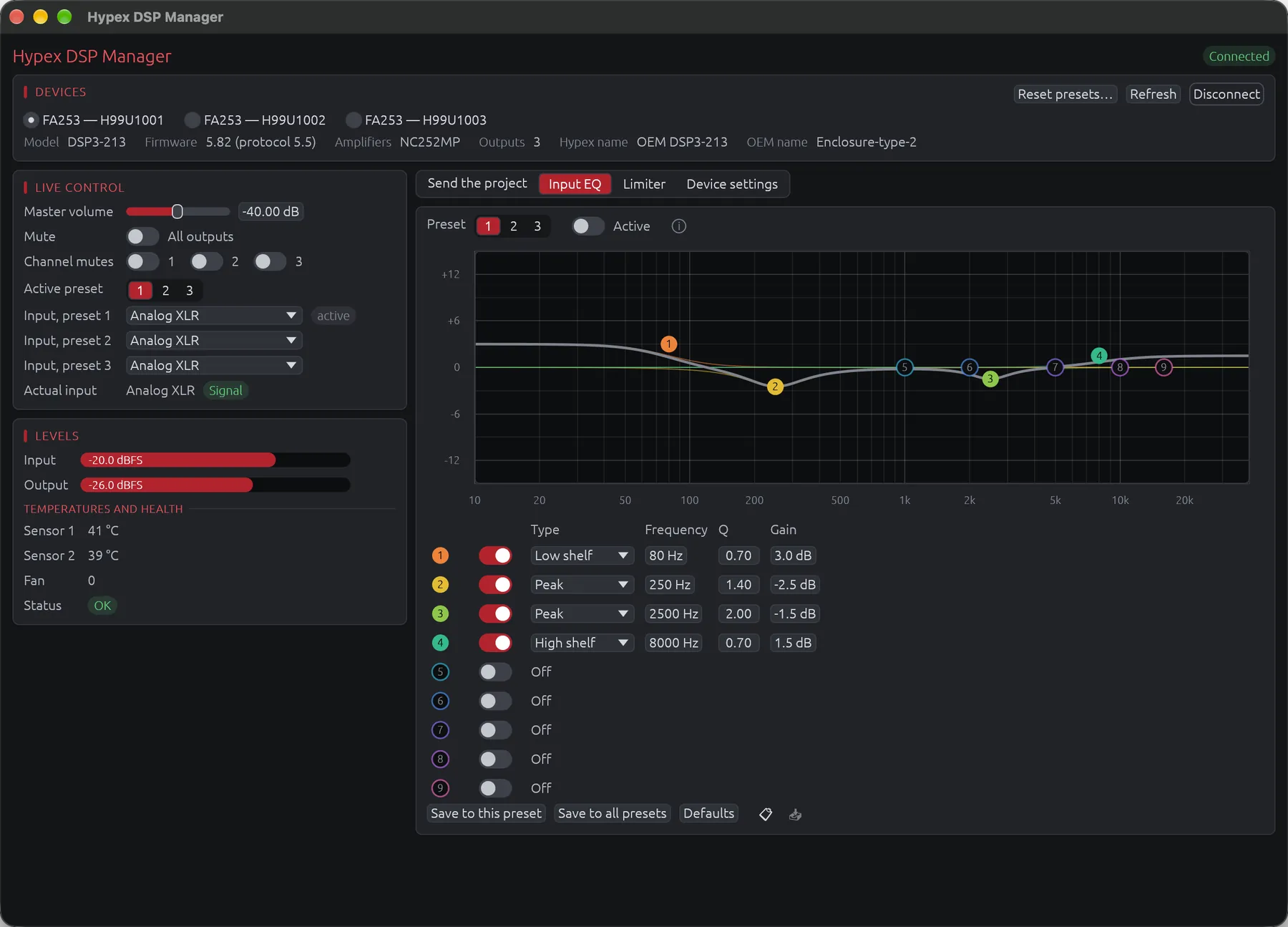
The same window controls the amplifier while it plays: volume, mutes, presets, inputs, input EQ, limiter and device settings.
The Hypex DSP Manager is part of the free version of LinFIR.
The Whole System in One Click
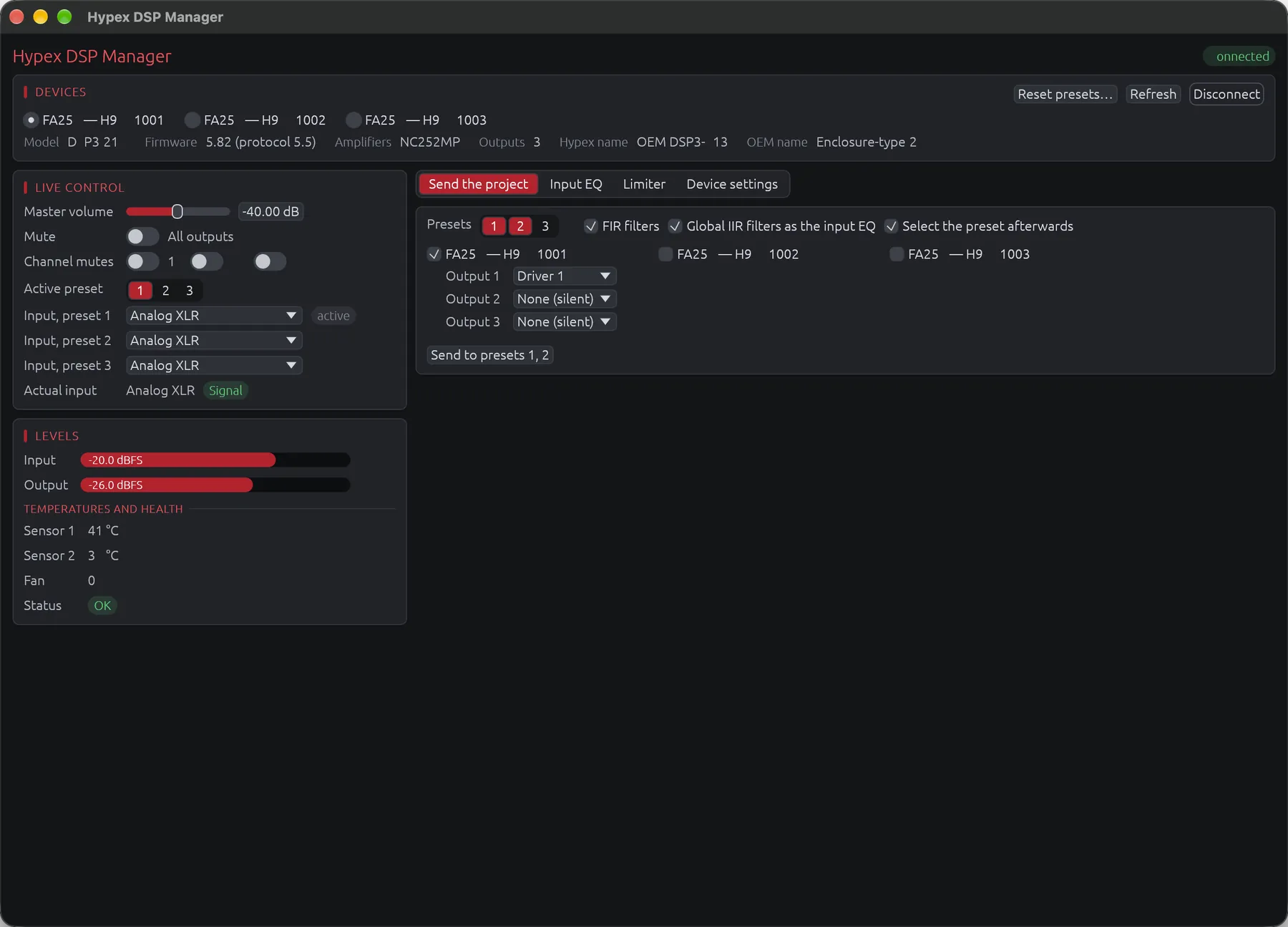
Connect every Hypex DSP of the system to the computer, for example the FA253 of a three-way speaker and the FA502 of its subwoofer. In the Hypex DSP Manager, each output of each DSP gets a driver of the project, and a driver can feed several outputs, like a dual voice coil subwoofer on both channels of an FA502. Choose the presets to fill, one, two or all three, then click Send to preset…, and LinFIR configures the DSPs one after the other, reading each write back to check it.
Each output receives its driver's IIR filters (up to 15 biquads), delay, gain and polarity. The FIR filters go to the outputs, one per driver, or to the input when you use a global correction, since the DSP can't take both. The project's global IIR filters become the preset's input EQ. The project has to run at 93,750 Hz, the sample rate of the Hypex DSPs.
Accurate low-frequency filters
Hypex DSPs store their biquad coefficients in fixed point (8.24). Rounded one at a time, they can move a low-frequency filter by several tenths of a dB. LinFIR chooses the coefficients of all the biquads of an output together, so that their small errors cancel out, and the deviation usually stays below 0.05 dB.
If a filter can't be placed that well, such as a narrow EQ near 30 Hz or a high-pass around 10 Hz, LinFIR lists it next to the send button once the project is sent.
Controlling the Amplifier
Live Control
Master volume, global and per-output mutes, active preset and the input of each preset
Monitoring
Input and output levels, temperatures, fan and amplifier health
Input EQ
Nine sections edited on their response curve, copied from one preset or amplifier to another
Limiter
Soft-clip limiter, set from the power and impedance of the speaker on each output
Device Settings
Standby, auto power-off, signal detection, master and slave, display, DAC filter, bridged outputs
DSP3-224 Routing
Input mixer and the signal sent to each output, preset by preset
Several Amplifiers
All connected at once, each output fed by any driver of the project
Reset
Clears the filters, gains and delays of a module's three presets and keeps its settings
Hypex FusionAmp Mode
Any Loudspeaker Design project at 93,750 Hz can be sent to a FusionAmp. LinFIR also has a project mode made for these amplifiers, which keeps the design within their limits from the start: 93.75 kHz, the channel count of your model, 15 biquads per channel, and FIR filters at the input (4,500 taps) or on the outputs (1,500 taps each). This mode is part of the Advanced Module.
I use FusionAmps in the speakers I design. The four-way studio monitors of this blog post run on an FA253 in each satellite and an FA502 in the sub.
Questions
Another question? Write to me.
Which products are supported?
Every product built on a Hypex DSP3-213 or DSP3-224 module, the FusionAmp amplifiers among them. For Hypex Filter Design, LinFIR also exports a Config.xml file for the FA122, FA123, FA251, FA252, FA253, FA501, FA502 and FA503.
Do I still need Hypex Filter Design?
No. LinFIR talks to the amplifier directly. If Hypex Filter Design is open, close it first, because only one program can use the amplifier at a time.
Is it safe for the amplifier?
LinFIR refuses any write that could damage the module, and checks each write by reading it back. A module protected by its owner's password stays locked until you unlock it.
Does it work on Linux?
Yes. The .deb and .rpm packages install the rule that lets LinFIR open the amplifier without administrator rights. With the AppImage, you add that rule yourself, as shown in the documentation.
Thank You, Hypex
I developed the Hypex DSP Manager in collaboration with Hypex, and I want to thank their team, who always made time for me. They are a pleasure to work with, and their products are excellent.
Try It on Your FusionAmp
Download LinFIR, open your project and send it to your amplifier. If something doesn't work with your model, write to me.